Quick Start Guide
Get started with Agent Orcha in minutes using Docker (recommended). Follow these steps to set up your first multi-agent system.
Agent Orcha Studio
Agent Orcha includes a built-in web dashboard accessible at http://localhost:3333 when the server is running. The Studio provides a visual interface for managing and testing your entire instance. When AUTH_PASSWORD is set, the Studio will prompt for the password before granting access.
Studio Tabs
| Tab | Description |
|---|---|
| Agents | Browse all agents and workflows, invoke with custom input, stream responses, manage conversation sessions. Workflows are integrated into the Agents tab. |
| Knowledge | Browse and search knowledge stores, view entities and graph structure for stores with direct mapping |
| MCP | Browse MCP servers, view available tools per server, call tools directly |
| Local LLM | Manage local LLM models via Omni (native local inference). Download, load, and unload models. Monitor engine status. |
| Skills | Browse and inspect available skills attached to agents |
| Monitor | View ReAct-loop metrics, LLM call logs with context size, token estimates, duration metrics, and real-time activity feed |
| IDE | Full in-browser file editor with file tree, syntax highlighting (YAML, JSON, JS), hot-reload on save, and Agent Composer for creating agents visually |
Docker Reference
Docker is the recommended way to run Agent Orcha. The ddalcu/agent-orcha image includes everything you need — no Node.js installation required.
Start the Server via Docker
On first run, Agent Orcha auto-scaffolds example configurations if no configs exist in the mounted volume.
docker run -p 3333:3333 -e AUTH_PASSWORD=mypass -v ./my-agent-orcha-project:/data ddalcu/agent-orcha startDocker Compose
For a more manageable setup, use a docker-compose.yaml file:
services:
  agent-orcha:
    image: ddalcu/agent-orcha
    ports:
      - "3333:3333"
    volumes:
      - ./my-agent-orcha-project:/data
    environment:
      AUTH_PASSWORD: mypass
Environment Variables
| Variable | Description | Default |
|---|---|---|
WORKSPACE |
Base directory for the project inside the container | /data |
PORT |
Port for the server to listen on | 3333 |
AUTH_PASSWORD |
When set, all API routes and the Studio UI require this password to access. When unset, no authentication is required. | unset (no auth) |
CORS_ORIGIN |
Controls cross-origin request policy. When unset, only same-origin requests are allowed. Set to * to allow all origins, or a specific URL (e.g. https://your-frontend.com) to allow that origin. |
unset (same-origin only) |
BROWSER_SANDBOX |
When true, starts Chromium + Xvfb + VNC inside the container for browser sandbox tools. The VNC viewer is accessible through the Studio UI at /vnc. |
true |
LOG_LEVEL |
Logging verbosity level (debug, info, warn, error) |
info |
EXPERIMENTAL_VISION |
When true, enables experimental vision browser tools (pixel-coordinate based browser control for vision LLMs) |
false |
BROWSER_VERBOSE |
When true, enables verbose logging for browser sandbox tools |
false |
P2P_ENABLED |
Set to false to disable P2P. Enabled by default. |
true |
P2P_PEER_NAME |
Display name for this peer on the P2P network. Also configurable in the P2P tab UI. | hostname |
P2P_NETWORK_KEY |
Shared key that identifies the P2P network. Only peers with the same key discover each other. Configurable in the P2P tab UI. | agent-orcha-default |
P2P_SHARE_LLMS |
When true, shares all active LLM models on the P2P network (overrides per-model share flag) |
false |
P2P_RATE_LIMIT |
Max incoming P2P requests per minute across all shared resources. 0 = unlimited. Configurable in the P2P tab UI. |
60 |
CLI Commands (npx alternative)
If you prefer not to use Docker, you can run Agent Orcha directly via npx (requires Node.js 24+).
| Command | Description | Options |
|---|---|---|
npx agent-orcha |
Start the server (auto-scaffolds project on first run if no configs exist) | Environment variables: PORT, HOST, WORKSPACE |
npx agent-orcha help |
Show help information | - |
Core Concepts
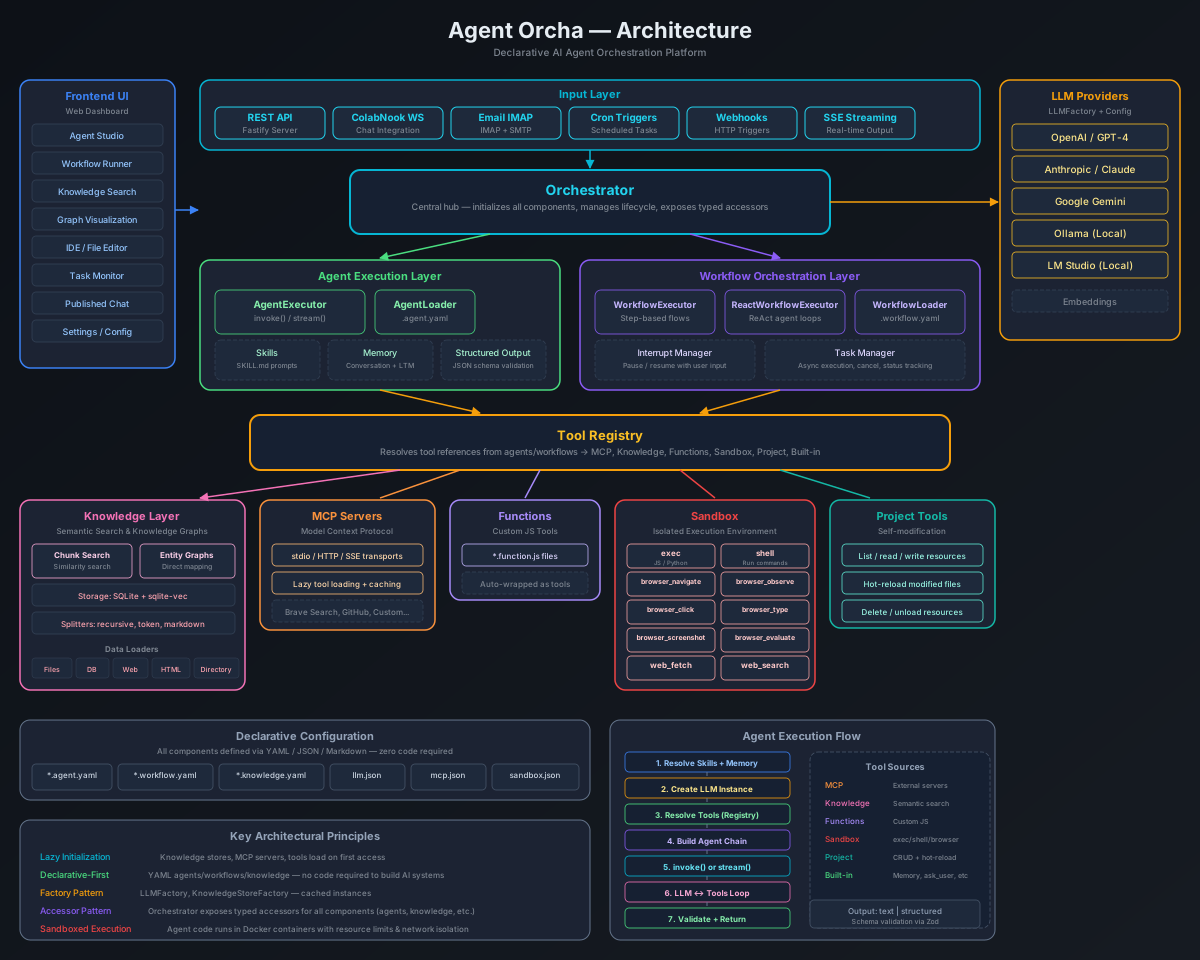
The diagram below shows how the major components fit together — from input sources through the orchestrator to tool execution.
Agents
Agents are AI-powered units that can use tools and respond to queries. Each agent is defined in a YAML file with its configuration.
Agent Schema
name: string                    # Unique identifier (required)
description: string             # Human-readable description (required)
version: string                 # Semantic version (default: "1.0.0")

model: string | object          # Reference to LLM config in models.yaml
  # Simple: model: default
  # With override: model: { name: default, temperature: 0.3 }
  # Per-type: model: { llm: default, image: flux, tts: qwen-tts }

prompt:                         # Prompt configuration (required)
  system: string                # System message/instructions
  inputVariables: [string]      # Variables to interpolate

tools:                          # Tools available to agent (optional)
  - mcp:<server-name>           # MCP server tools
  - knowledge:<store-name>      # Knowledge store search
  - function:<function-name>    # Custom functions
  - builtin:<tool-name>         # Built-in tools (ask_user, save_memory, generate_image, generate_tts, generate_video)
  - sandbox:<tool-name>         # Sandbox tools (exec, shell, browser_*, vision_*, file_*, web_*)
  - workspace:<tool-name>       # Workspace tools (read, write, delete, list, list_resources, diagnostics)
  - org:<tool-name>             # Organization tools (tickets, routines, org chart)

skills:                         # Skills to inject into system prompt (optional)
  - skill-name                  # Array of skill names
  # Or: skills: { mode: all }   # Attach all available skills

memory: boolean | object        # Persistent memory across sessions (optional)
  # Simple: memory: true
  # With options: memory: { enabled: true, maxLines: 100 }

output:                         # Output formatting (optional)
  format: text | structured
  schema:                       # Required when format is "structured"
    type: object
    properties: { ... }
    required: [string]

triggers:                       # Automatic execution triggers (optional)
  - type: cron
    schedule: "0 9 * * *"       # Cron expression
    input: { key: value }       # Input for the agent
  - type: webhook
    path: /api/triggers/webhooks/my-hook
    input: { key: value }       # Base input (merged with request body)

integrations:                   # External connectors (optional)
  - type: collabnook            # Chat platform connector
    url: https://collabnook.example.com
    channel: general
    botName: orcha-bot
  - type: email                 # Email connector (IMAP + SMTP)
    imap: { host: imap.gmail.com, port: 993, secure: true }
    smtp: { host: smtp.gmail.com, port: 587, secure: false }
    auth: { user: agent@example.com, pass: app-password }

publish: boolean | object       # Standalone chat page (optional)
  # Simple: publish: true
  # With password: publish: { enabled: true, password: "secret" }

p2p: boolean | object            # P2P sharing and leverage (optional)
  # Simple: p2p: true
  # Full: p2p: { share: true, leverage: 'local-first' }

maxIterations: number           # Override default 200 iteration limit (optional)

sampleQuestions:                # Example prompts shown in UI (optional)
  - "What can you help me with?"
  - "Tell me about..."
Example Agent with Tools
name: researcher
description: Researches topics using knowledge search and web fetch
version: "1.0.0"

model:
  name: default
  temperature: 0.5

prompt:
  system: |
    You are a thorough researcher. Use available tools
    to gather information before responding.
  inputVariables:
    - topic

tools:
  - mcp:fetch
  - knowledge:docs
  - function:fibonacci

output:
  format: text
Structured Output
Agents can return validated, structured JSON output by specifying an output.schema. This ensures responses match your schema with automatic validation.
name: sentiment-structured
description: Sentiment analysis with structured output

model:
  name: default
  temperature: 0

prompt:
  system: |
    Analyze the sentiment of the provided text.
  inputVariables:
    - text

output:
  format: structured
  schema:
    type: object
    properties:
      sentiment:
        type: string
        enum: [positive, negative, neutral]
      confidence:
        type: number
        minimum: 0
        maximum: 1
      keywords:
        type: array
        items:
          type: string
    required:
      - sentiment
      - confidence
Conversation Memory
Agents support session-based conversation memory for multi-turn dialogues. Pass a sessionId in API calls to maintain context across interactions.
- In-memory session storage with custom message types
- Automatic FIFO message limit (default: 50 messages per session)
- Optional TTL-based session cleanup
- Session management API endpoints for stats and cleanup
# First message with sessionId
curl -X POST http://localhost:3333/api/agents/chatbot/invoke \
  -H "Content-Type: application/json" \
  -d '{"input": {"message": "My name is Alice"}, "sessionId": "user-123"}'

# Second message - agent remembers context
curl -X POST http://localhost:3333/api/agents/chatbot/invoke \
  -H "Content-Type: application/json" \
  -d '{"input": {"message": "What is my name?"}, "sessionId": "user-123"}'
Workflows
Workflows orchestrate multiple agents. Agent Orcha supports two workflow types: step-based (sequential/parallel with explicit steps) and ReAct (autonomous, prompt-driven).
Step-Based Workflow Schema
name: string                    # Unique identifier (required)
description: string             # Human-readable description (required)
version: string                 # Semantic version (default: "1.0.0")
type: steps                     # Optional (steps is default)

input:                          # Input schema (required)
  schema:
    <field_name>:
      type: string | number | boolean | array | object
      required: boolean
      default: any
      description: string

steps:                          # Workflow steps (required)
  - id: string                  # Unique step identifier
    agent: string               # Agent name to execute
    input:                      # Input mapping using templates
      <key>: "{{input.field}}"
      <key>: "{{steps.stepId.output}}"
    condition: string           # Optional conditional execution
    retry:                      # Optional retry configuration
      maxAttempts: number
      delay: number
    output:
      key: string

  # Parallel execution block
  - parallel:
      - id: step-a
        agent: agent-a
        input: { ... }

config:                         # Workflow configuration (optional)
  timeout: number               # Total timeout ms (default: 300000)
  onError: stop | continue | retry

chatOutputFormat: text | json   # Output format for chat/stream (optional, default: text)

sampleQuestions:                # Example prompts shown in UI (optional)
  - "Run with default settings"

output:                         # Output mapping (required)
  <key>: "{{steps.stepId.output}}"
Template Syntax
Access data within workflows using double curly braces:
| Template | Description |
|---|---|
{{input.fieldName}} |
Access workflow input field |
{{steps.stepId.output}} |
Access step output |
{{steps.stepId.output.nested.path}} |
Access nested output |
{{steps.stepId.metadata.duration}} |
Access step metadata |
ReAct Workflows
ReAct workflows use autonomous agents that discover and call tools/agents based on your prompt, without explicit step definitions.
ReAct Schema
name: string
type: react                     # Required for ReAct

input:
  schema:
    <field>:
      type: string
      required: true

prompt:
  system: string                # System instructions
  goal: string                  # Goal template (supports {{input.*}})

graph:
  model: string                 # LLM config name from models.yaml
  executionMode: react | single-turn  # Default: react
  tools:
    mode: all | include | exclude | none
    sources: [mcp, knowledge, function, builtin]
    include: [string]           # For mode: include
    exclude: [string]           # For mode: exclude
  agents:
    mode: all | include | exclude | none
  maxIterations: number         # Default: 10
  timeout: number               # Default: 300000

output:
  <key>: "{{state.messages[-1].content}}"
Execution Modes
| Mode | Behavior | Best For |
|---|---|---|
single-turn |
Calls tools once, then returns | Research, data gathering, straightforward tasks |
react |
Multiple rounds of tool calls with analysis | Complex problems, iterative refinement |
Human-in-the-Loop
ReAct workflows support the builtin:ask_user tool. When called, the workflow pauses and waits for user input. In the Studio Workflows tab, an inline input prompt appears automatically — type your response and the workflow resumes. You can also respond via the Monitor tab or the Tasks API (POST /api/tasks/:id/respond).
Functions
Functions are custom JavaScript tools that extend agent capabilities. They're simple to create and require no dependencies.
Function Schema
export default {
  name: 'function-name',
  description: 'What it does',

  parameters: {
    param1: {
      type: 'number',  // string | number | boolean | array | object | enum
      description: 'Parameter description',
      required: true,
      default: 0,
    },
  },

  execute: async ({ param1 }) => {
    // Your logic here
    return `Result: ${param1}`;
  },
};

export const metadata = {
  name: 'function-name',
  version: '1.0.0',
  author: 'Your Name',
  tags: ['category'],
};
Example Function
export default {
  name: 'fibonacci',
  description: 'Returns the nth Fibonacci number (0-based indexing)',

  parameters: {
    n: {
      type: 'number',
      description: 'The index (0-based, max 100)',
    },
  },

  execute: async ({ n }) => {
    if (n < 0 || !Number.isInteger(n)) {
      throw new Error('Index must be a non-negative integer');
    }
    if (n > 100) {
      throw new Error('Index too large (max 100)');
    }

    if (n === 0) return 'Fibonacci(0) = 0';
    if (n === 1) return 'Fibonacci(1) = 1';

    let prev = 0, curr = 1;
    for (let i = 2; i <= n; i++) {
      [prev, curr] = [curr, prev + curr];
    }

    return `Fibonacci(${n}) = ${curr}`;
  },
};
MCP Servers
Model Context Protocol (MCP) servers provide external tools to agents. Configure them in mcp.json.
MCP Configuration
{
  "version": "1.0.0",
  "servers": {
    "fetch": {
      "transport": "streamable-http",
      "url": "https://remote.mcpservers.org/fetch/mcp",
      "description": "Web fetch capabilities",
      "timeout": 30000,
      "enabled": true
    },
    "filesystem": {
      "transport": "stdio",
      "command": "npx",
      "args": ["-y", "@modelcontextprotocol/server-filesystem", "/tmp"]
    }
  },
  "globalOptions": {
    "throwOnLoadError": false,
    "prefixToolNameWithServerName": true,
    "defaultToolTimeout": 30000
  }
}
Skills
Skills are prompt augmentation units that expand what an agent knows how to do. Unlike tools or functions, skills are not executable code — they are knowledge and instruction bundles (Markdown files) that get injected into an agent's system prompt at runtime.
Directory Structure
Each skill lives in its own directory under skills/:
skills/
  orcha-builder/
    SKILL.md
  pii-guard/
    SKILL.md
  sandbox/
    SKILL.md
  web-pilot/
    SKILL.md
SKILL.md Format
A SKILL.md file has optional YAML frontmatter followed by Markdown content:
---
name: pii-guard
description: PII and OWASP security filtering rules
---

# PII Guard

## Sensitive Data Categories (NEVER include in responses)

- SSN, tax IDs, government identifiers
- Salary, compensation, financial data
- Home addresses, personal phone numbers
- Dates of birth, ages
- Full email addresses (mask as j***@company.com)
The frontmatter fields:
- name — Unique skill identifier. If omitted, the directory name is used.
- description — Human-readable description shown in the UI and API.
Agent Configuration
Attach skills to agents in their YAML definition file:
# Specific skills by name
name: corporate
description: Friendly corporate assistant
model: default
prompt:
  system: You are a friendly corporate assistant.
  inputVariables:
    - query
skills:
  - pii-guard

# Or attach all available skills
skills:
  mode: all
How It Works
When an agent with skills is invoked, the skill content is appended to the agent's system prompt before the LLM call. Each skill is wrapped in <skill name="..."> delimiters so the LLM can distinguish between different skill instructions.
Creating Custom Skills
- Create a directory under
skills/with your skill name. - Add a
SKILL.mdfile with frontmatter and instructions. - Reference the skill name in your agent's
skillsarray. - Restart the server or use hot-reload to pick up changes.
Community Skills Registry
Community-contributed skills that you can copy into your project:
| Name | Description | Author |
|---|---|---|
| orcha-builder | Documentation for creating and modifying ORCHA resources | Agent Orcha |
| pii-guard | PII and OWASP security filtering rules | Agent Orcha |
| sandbox | JavaScript sandbox, shell, web fetch, and browser tools | Agent Orcha |
| web-pilot | Browser automation via observe-act loop with element refs | Agent Orcha |
Want to contribute a skill? Add it to templates/skills/ and submit a pull request to the repository.
Tasks
Tasks provide async execution for agents and workflows. Submit a task, poll its status, stream updates via SSE, or cancel it. Tasks are managed in-memory with automatic cleanup.
Task Lifecycle
Tasks progress through these statuses:
submitted → working → completed | failed | canceled
ReAct workflows may also reach input-required when the builtin:ask_user tool is called, pausing until you respond via the API.
Submit a Task
# Submit an agent task
curl -X POST http://localhost:3333/api/tasks/agent \
  -H "Content-Type: application/json" \
  -d '{
    "agent": "researcher",
    "input": {"topic": "AI trends"},
    "sessionId": "optional-session-id"
  }'

# Submit a workflow task
curl -X POST http://localhost:3333/api/tasks/workflow \
  -H "Content-Type: application/json" \
  -d '{
    "workflow": "research-paper",
    "input": {"topic": "AI trends"}
  }'
Stream Task Status (SSE)
curl -N http://localhost:3333/api/tasks/TASK_ID/streamRespond to Input Request
When a ReAct workflow reaches input-required, respond to continue execution:
curl -X POST http://localhost:3333/api/tasks/TASK_ID/respond \
  -H "Content-Type: application/json" \
  -d '{"response": "Yes, proceed with option A"}'
Sandbox
The sandbox system provides isolated execution environments for agents. It includes tools for JavaScript execution, shell commands, web interaction, and browser automation.
Configuration
Configure sandbox behavior in sandbox.json (optional — defaults to enabled):
{
  "enabled": true,
  "commandTimeout": 30000,
  "maxOutputChars": 50000,
  "browserCdpUrl": "http://localhost:9222"
}
Sandbox Tools
| Tool | Description | Parameters |
|---|---|---|
sandbox:exec |
Execute JavaScript code in a sandboxed VM | code (string), timeout (number, optional) |
sandbox:shell |
Execute shell commands as a non-root sandbox user |
command (string), timeout (number, optional) |
sandbox:web_fetch |
Fetch a web page and convert HTML to Markdown | url (string), raw (boolean, optional) |
sandbox:web_search |
Search the web via DuckDuckGo | query (string), num_results (number, optional) |
sandbox:browser_navigate |
Navigate the browser to a URL and wait for page load | url (string) |
sandbox:browser_observe |
Get a text snapshot of the current page (accessibility tree) | — |
sandbox:browser_click |
Click an element by CSS selector | selector (string) |
sandbox:browser_type |
Type text into a focused element | selector (string), text (string) |
sandbox:browser_screenshot |
Take a screenshot (returns image to the LLM as a multimodal content part) | — |
sandbox:browser_evaluate |
Execute JavaScript in the browser page context | expression (string) |
sandbox:vision_screenshot |
Take a screenshot for vision LLM analysis | — |
sandbox:vision_navigate |
Navigate browser (vision mode) to a URL | url (string) |
sandbox:vision_click |
Click at pixel coordinates (vision mode) | x (number), y (number) |
sandbox:vision_type |
Type text at current focus (vision mode) | text (string) |
sandbox:vision_scroll |
Scroll the page (vision mode) | x (number), y (number), deltaY (number) |
sandbox:vision_key |
Press a keyboard key (vision mode) | key (string) |
sandbox:vision_drag |
Drag from one point to another (vision mode) | startX, startY, endX, endY (numbers) |
sandbox:file_read |
Read a file from the sandbox filesystem | path (string) |
sandbox:file_write |
Write content to a file in the sandbox filesystem | path (string), content (string) |
Browser Sandbox (Docker)
Browser tools require Chromium running inside the Docker container. Set BROWSER_SANDBOX=true (enabled by default in the Docker image) to start Xvfb + Chromium + VNC automatically. The VNC viewer is accessible through the Studio UI at /vnc (protected by AUTH_PASSWORD when set).
Using Sandbox Tools in Agents
name: code-runner
description: Agent that can execute code and search the web
model: default

prompt:
  system: |
    You can execute JavaScript code and search the web.
  inputVariables:
    - task

tools:
  - sandbox:exec
  - sandbox:shell
  - sandbox:web_fetch
  - sandbox:web_search
  - sandbox:browser_navigate
  - sandbox:browser_observe
  - sandbox:browser_click
  - sandbox:browser_type
  - sandbox:browser_screenshot
  - sandbox:browser_evaluate
Persistent Memory
Agent Orcha has two memory layers. Conversation memory (session-based, in-memory) tracks multi-turn dialogues. Persistent memory saves facts to disk so agents remember across sessions and server restarts.
Agent Configuration
name: assistant
description: Agent with persistent memory
model: default

prompt:
  system: |
    You are a helpful assistant. Save important facts
    about the user to your memory for future sessions.
  inputVariables:
    - message

memory: true        # Enable persistent memory
How It Works
- When
memory: true, the agent gets asave_memorybuilt-in tool - Memory is stored as Markdown files in
.memory/{agentName}.md - On each invocation, prior memory is loaded and injected into the system prompt
- The agent decides what to remember by calling
save_memory
Triggers
Triggers allow agents to run automatically on a schedule (cron) or in response to external events (webhook).
Cron Trigger
name: daily-reporter
description: Runs every morning at 9am
model: default

prompt:
  system: Generate a daily summary report.
  inputVariables:
    - task

triggers:
  - type: cron
    schedule: "0 9 * * *"
    input:
      task: "Generate the daily report"
Webhook Trigger
name: webhook-handler
description: Responds to external webhook events
model: default

prompt:
  system: Process the incoming webhook payload.
  inputVariables:
    - data

triggers:
  - type: webhook
    path: /api/triggers/webhooks/webhook-handler
    input:
      data: "default context"
Webhook triggers register a POST endpoint at the specified path. The request body is merged with the base input and the agent is invoked immediately.
Integrations
Integrations connect agents to external communication platforms. When configured, agents can receive messages from external sources and respond back through the same channel. Agent Orcha currently supports two integration types: Collabnook (real-time chat) and Email (IMAP/SMTP).
Integrations are added to agents via the integrations field in the agent YAML. Each integration type injects its own input variables and tools into the agent automatically.
Collabnook
Collabnook is a minimalistic anonymous chat with audio and video calls — no sign-up required. The Collabnook integration connects to it via WebSocket. When active, the agent joins a channel and responds to @mentions in real time.
How It Works
- The agent connects to the Collabnook server via WebSocket and joins the specified channel
- When a user @mentions the bot name, the agent is invoked with the message
- Recent channel messages and member lists are automatically injected as input variables (
channelContext,channelMembers) - The agent's response is posted back to the channel
- Combined with cron triggers, agents can also proactively monitor and respond to channel activity on a schedule
Schema
| Field | Type | Description |
|---|---|---|
type |
string | "collabnook" (required) |
url |
string | Collabnook server URL (required) |
channel |
string | Channel to join (required) |
botName |
string | Display name for the bot in the channel (required) |
password |
string | Server password if authentication is required (optional) |
replyDelay |
number | Delay in ms before posting the reply (optional) |
Example
name: channel-bot
description: Bot connected to a chat channel
model: default

prompt:
  system: |
    You are a channel assistant.
    Use the channel context to respond to messages.
  inputVariables:
    - message
    - channelContext
    - channelMembers

integrations:
  - type: collabnook
    url: https://collabnook.example.com
    channel: general
    botName: orcha-bot
Injected Input Variables
| Variable | Description |
|---|---|
channelContext |
Recent channel messages formatted as text |
channelMembers |
List of channel members with userId and name |
Connect agents to email via IMAP polling (inbound) and SMTP (outbound). The agent polls a mailbox folder for new emails and is automatically invoked when one arrives. The agent's response is sent back to the original sender as a reply. Agents also receive an email_send tool for composing new outbound emails to any address.
How It Works
- The agent connects to the IMAP server and polls the configured folder at a regular interval
- New (unseen) emails trigger the agent with the email content as input
- The agent's response is automatically sent back to the original sender via SMTP
- The agent also gets an
email_sendbuilt-in tool for composing new emails to arbitrary recipients
Schema
| Field | Type | Description |
|---|---|---|
type |
string | "email" (required) |
imap.host |
string | IMAP server hostname (required) |
imap.port |
number | IMAP port (default: 993) |
imap.secure |
boolean | Use TLS for IMAP (default: true) |
smtp.host |
string | SMTP server hostname (required) |
smtp.port |
number | SMTP port (default: 587) |
smtp.secure |
boolean | Use TLS for SMTP (default: false) |
auth.user |
string | Email account username (optional) |
auth.pass |
string | Email account password or app password (optional) |
fromName |
string | Display name for outbound emails (optional) |
fromAddress |
string | From address override — defaults to auth.user (optional) |
pollInterval |
number | Seconds between mailbox checks (default: 60) |
folder |
string | IMAP folder to monitor (default: INBOX) |
Example
name: support-agent
description: Handles inbound support emails
model: default

prompt:
  system: |
    You are a customer support agent.
    Reply helpfully to inbound emails.
    Use the email_send tool if you need to
    contact other departments.
  inputVariables:
    - message

integrations:
  - type: email
    imap:
      host: imap.gmail.com
      port: 993
      secure: true
    smtp:
      host: smtp.gmail.com
      port: 587
      secure: false
    auth:
      user: support@example.com
      pass: app-password
    fromName: "Support Agent"
    pollInterval: 30
    folder: INBOX
Injected Tools
| Tool | Description | Parameters |
|---|---|---|
email_send |
Compose and send a new email | to (string), subject (string), body (string) |
Published Agents
Published agents get standalone chat pages accessible at /chat/<agent-name>, independent of the Studio UI. This is useful for sharing agents with end-users who don't need access to the full Studio interface.
Configuration
Add the publish field to any agent YAML file:
# Simple — publish with no password
name: my-chatbot
description: A helpful assistant
model: default
prompt:
  system: You are a helpful assistant.
  inputVariables:
    - message
publish: true# With password protection
publish:
enabled: true
password: "secret123"How It Works
- Visit
/chat/<agent-name>to open the standalone chat page - If password-protected, users must authenticate before chatting
- The password is per-agent and independent of the global
AUTH_PASSWORD - The standalone page supports markdown rendering, code highlighting, thinking blocks, tool call visualization, and file attachments
- Sessions are ephemeral (per browser tab) and use
sessionStorage - Unpublished agents and non-existent agents return a 404
P2P Network
Agent Orcha includes a peer-to-peer network powered by Hyperswarm that lets multiple instances discover each other and share agents and LLM engines across the network.
Enabling P2P
P2P is enabled by default. To disable it, set P2P_ENABLED=false or toggle it off in the P2P tab in Studio. You can also enable/disable, change the machine name, set a private network key, and configure rate limiting from the P2P tab UI at runtime.
Sharing Agents
Add p2p: true (shorthand) or p2p: { share: true } (full form) to any agent YAML to share it with connected peers:
name: my-agent
description: A shared agent
model: default
prompt:
  system: You are helpful.
  inputVariables:
    - query
p2p:
  share: true
Sharing LLM Engines
Add share: true to a model entry in models.yaml, or use the P2P share toggle on each provider in the LLM tab. Only active models with share: true are shared. Other instances can then use the remote LLM by configuring an agent with model: "p2p" or model: "p2p:model-name".
llm:
  omni:
    provider: omni
    model: gemma-4-E2B-it-IQ4_NL
    active: true
    share: true
Alternatively, set P2P_SHARE_LLMS=true to share all active models without marking them individually.
Using Remote Resources
There are three ways to use remote P2P resources:
- Direct LLM chat (P2P tab) — Select a remote peer's LLM from the P2P tab and chat with it directly. Pure LLM inference with no agent or tools involved.
- Remote agent invocation (P2P tab) — Invoke a peer's shared agent. The agent runs entirely on the host — their LLM, their tools, their knowledge stores. You receive the streamed output.
- Local agent with remote LLM — Configure your agent with
model: "p2p"(auto-selects first available) ormodel: "p2p:model-name". The agent runs locally with your tools, react loop, memory, and knowledge stores, while only the LLM inference happens on the remote peer. Tool calling is fully supported — the remote LLM generatestool_calls, your local agent executes them, and results feed back over the wire.
- Conversation history for remote LLMs is managed on the caller side — the host peer is stateless
- No API keys, base URLs, or engine details are shared — only the model name, provider, and model identifier
P2P Model Leverage
Control how agents use remote peer models for image, TTS, and video tasks via the p2p.leverage field:
p2p:
  share: true
leverage: remote-first| Mode | Behavior |
|---|---|
false |
P2P leverage disabled (default) |
local-first |
Use local models; fall back to P2P if local fails or is unavailable |
remote-first |
Try P2P peers first for model tasks (image, TTS); fall back to local if no peers respond |
remote-only |
Only use P2P peers for model tasks — skip local models entirely |
The leverage modes apply to model tools (image generation, TTS, video). For explicit P2P LLM chat routing, use model: p2p or model: p2p:model-name on the agent. Boolean true is backward-compatible and maps to local-first.
Load Balancing
When multiple peers share the same model, requests are automatically distributed using a least-loaded selection strategy:
- Client-side tracking — Each node tracks in-flight requests per peer. New requests are routed to the peer with the fewest outstanding requests from this node.
- Peer-reported load — Peers broadcast their current active task count via catalog updates when tasks start and complete. Other nodes factor this into peer selection.
- Tie-breaking — When multiple peers have equal load scores, one is chosen at random to avoid clustering.
This ensures requests spread evenly across peers without requiring a central coordinator. The combined score (in-flight from caller + reported load from peer) gives accurate load distribution even when multiple callers share the same peers.
P2P Configuration UI
The P2P tab in Studio provides a settings panel (shown when no agent/LLM is selected) where you can:
- Enable/Disable P2P — toggle the swarm connection on or off at runtime
- Machine Name — change how this instance appears to peers
- Network Key — switch between the default public network and a private network key (SHA-256 hashed)
- Rate Limit — set max incoming requests per minute across all shared resources (default: 60, 0 = unlimited)
- Sharing Status — view which agents and LLMs you are currently sharing
Environment Variables
| Variable | Description | Default |
|---|---|---|
P2P_ENABLED |
Set to false to disable P2P |
true |
P2P_PEER_NAME |
Display name for this peer | hostname |
P2P_NETWORK_KEY |
Shared key to scope peer discovery | agent-orcha-default |
P2P_SHARE_LLMS |
Share all active LLM models (overrides per-model flag) | false |
P2P_RATE_LIMIT |
Max incoming requests per minute (0 = unlimited) | 60 |
Organizations
The organization system enables multi-tenant management of teams, tickets, routines, and org charts. Each organization has a CEO agent that coordinates work, processes tickets, and maintains operational heartbeats.
Key Concepts
- Tickets — Work items assigned to agents within an organization. Support priority levels, status tracking, and agent assignment.
- Routines — Recurring scheduled tasks for the organization, executed by the CEO agent on a cron schedule.
- Org Chart — Hierarchical structure defining roles, agents, and reporting lines within the organization.
- CEO Agent — A special coordinating agent that manages the organization, delegates tickets, runs routines, and sends heartbeats.
- Heartbeats — Periodic status updates from the CEO agent about organizational health and activity.
Organization Tools
Organization tools are available to agents via the org:<tool-name> prefix. These tools allow agents to interact with the organization system programmatically.
Knowledge Stores
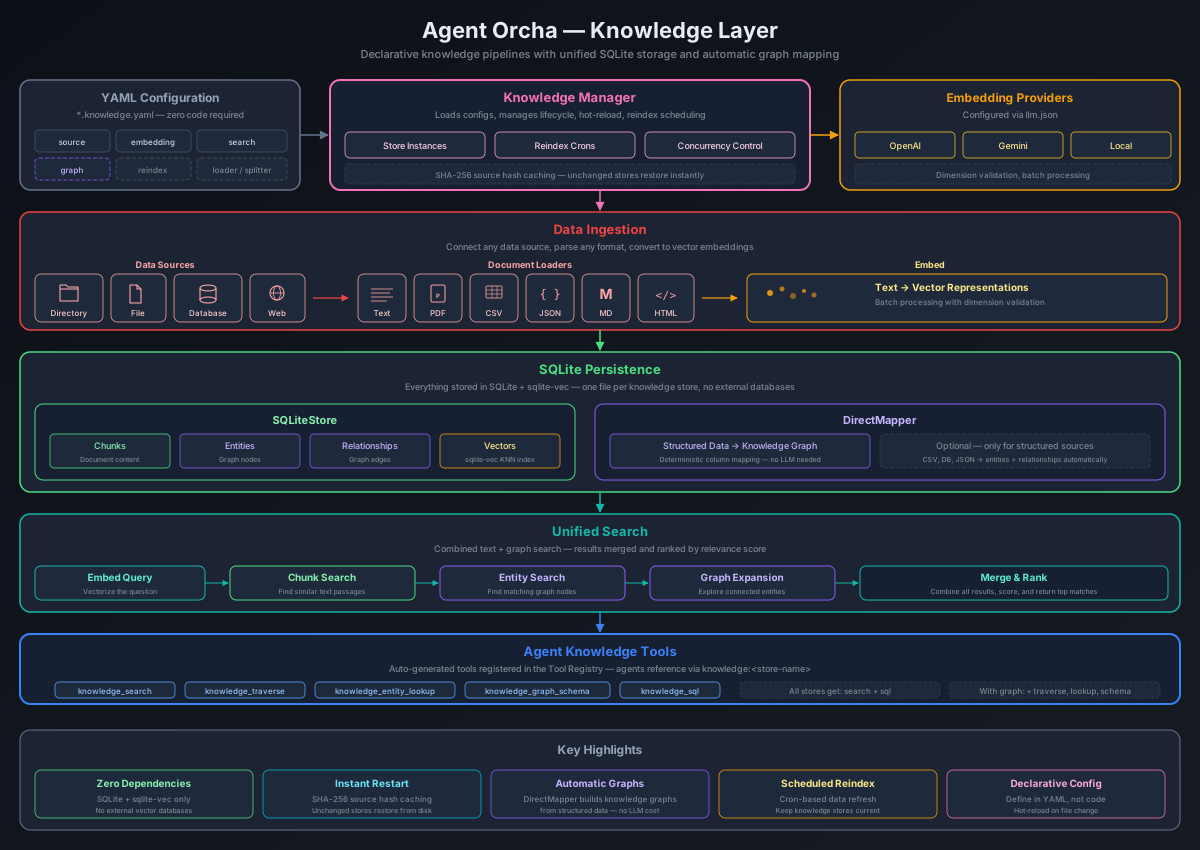
Knowledge stores are one of the most powerful features of Agent Orcha and a key differentiator from other agentic frameworks. They combine semantic vector search, knowledge graphs, and direct SQL querying in a single unified system — all from a simple YAML definition.
Most frameworks stop at basic RAG (embed chunks, search by similarity). Agent Orcha goes further:
- Vector search — Semantic similarity search powered by SQLite + sqlite-vec. No external vector databases (Chroma, Pinecone, etc.) required.
- Knowledge graphs — Build entity graphs from structured data via
directMapping. Deterministic extraction from columns — no LLM calls, 100% data preservation. - Direct SQL querying — For database-backed stores (PostgreSQL, MySQL, SQLite), agents automatically get a readonly SQL tool to query the source data directly. This means agents can do precise filtering, aggregation, joins, and counts that semantic search alone cannot provide.
- Zero-config persistence — All data is persisted to SQLite. On restart, unchanged stores restore instantly without re-indexing.
Knowledge Store Schema
All knowledge stores share a single unified schema. A store without graph does vector-only search; adding graph.directMapping enables entity extraction and graph traversal.
Schema
name: string                    # Unique identifier (required)
description: string             # Human-readable description (required)

source:                         # Data source (required)
  type: directory | file | database | web
  # Web-specific options:
  selector: string              # CSS selector for html loader (optional)
  headers: { key: value }       # Custom/auth headers (optional)
  jsonPath: string              # Dot-notation path to extract nested array from JSON (optional)

loader:                         # Document loader (optional)
  type: text | pdf | csv | json | markdown | html
  # Defaults: html for web sources, text for file/directory
  # Not used for database sources (has its own row-to-document logic)

splitter:                       # Text chunking (required)
  type: character | recursive | token | markdown
  chunkSize: number             # Characters per chunk (default: 1000)
  chunkOverlap: number          # Overlap between chunks (default: 200)

embedding: string               # Reference to embedding config in models.yaml (default: "default")

graph:                          # Optional - enables entity graph
  directMapping:                # Maps structured data to entities and relationships
    entities:
      - type: string            # Entity type name
        idColumn: string        # Column used as unique ID
        nameColumn: string      # Column used as display name (optional)
        properties: [string]    # Columns to include as entity properties
    relationships:              # Optional
      - type: string            # Relationship type name
        source: string          # Source entity type
        target: string          # Target entity type
        sourceIdColumn: string  # Column linking to source entity
        targetIdColumn: string  # Column linking to target entity

search:                         # Search configuration (optional)
  defaultK: number              # Results per search (default: 4)
  scoreThreshold: number        # Minimum similarity score (0-1)

reindex:                        # Periodic re-indexing (optional)
  schedule: string              # Cron expression (e.g., "0 * * * *" for hourly)
Example: Vector-Only Store
name: docs
description: Documentation for semantic search

source:
  type: directory
  path: knowledge/sample-data
  pattern: "*.txt"

loader:
  type: text

splitter:
  type: character
  chunkSize: 1000
  chunkOverlap: 200

embedding: default

search:
  defaultK: 4
  scoreThreshold: 0.2
Direct Mapping (Graph)
Add a graph.directMapping section to build a knowledge graph from structured data (database, CSV, or JSON sources). Entities and relationships are mapped deterministically from columns/keys — no LLM calls during extraction, 100% data preservation.
Example: Blog Posts with Authors
name: blog-posts
description: Blog posts with authors as a knowledge graph

source:
  type: database
  connectionString: postgresql://user:pass@localhost:5432/blog
  query: |
    SELECT p.id, p.title, p.slug, p.html AS content,
           u.name AS author_name, u.email AS author_email
    FROM posts p
    LEFT JOIN users u ON p.author_id = u.id
    WHERE p.status = 'published'
  contentColumn: content
  metadataColumns: [id, title, slug, author_name, author_email]

splitter:
  type: recursive
  chunkSize: 2000
  chunkOverlap: 300

embedding: default

graph:
  directMapping:
    entities:
      - type: Post
        idColumn: id
        nameColumn: title
        properties: [title, slug, content]

      - type: Author
        idColumn: author_email
        nameColumn: author_name
        properties: [author_name, author_email]

    relationships:
      - type: WROTE
        source: Author
        target: Post
        sourceIdColumn: author_email
        targetIdColumn: id

search:
  defaultK: 10
Each entity definition maps a row's columns to a graph node. The idColumn determines uniqueness (duplicate IDs are merged), nameColumn sets the display name, and properties lists which columns to attach as node properties. Relationships connect entities via their ID columns.
Example: Web JSON API with Graph
You can also build knowledge graphs from JSON API endpoints. When a JSON source contains an array of objects, each object is treated as a row with keys mapped to columns — just like database and CSV sources.
name: team-directory
description: Team members from internal API

source:
  type: web
  url: https://api.internal.com/v1/employees
  jsonPath: data.employees
  headers:
    Authorization: "Bearer ${EMPLOYEE_API_TOKEN}"

loader:
  type: json

splitter:
  type: character
  chunkSize: 500

embedding: default

graph:
  directMapping:
    entities:
      - type: Employee
        idColumn: id
        nameColumn: name
        properties: [name, email, role]
      - type: Department
        idColumn: department
        nameColumn: department
        properties: [department]
    relationships:
      - type: BELONGS_TO
        source: Employee
        target: Department
        sourceIdColumn: id
        targetIdColumn: department
How It Works
- All stores persist to SQLite via
.knowledge-data/{name}.db - On startup, source hashes are compared — if unchanged, data is restored from SQLite without re-indexing
- Stores with
graph.directMappingalso store entities and relationships in SQLite, with vector embeddings for entity similarity search - Agents get additional graph tools (traverse, entity_lookup, graph_schema) when entities exist
Source Types
All knowledge stores support the same source types for loading documents.
| Type | Description | Key Options |
|---|---|---|
directory |
Load files from a local directory | path, pattern (glob), recursive |
file |
Load a single file | path |
database |
Query PostgreSQL, MySQL, or SQLite. Agents also get a readonly SQL tool for direct querying. | connectionString, query, contentColumn, metadataColumns, batchSize |
web |
Fetch content from a URL (HTML, JSON, text, CSV) | url, selector (CSS, html only), headers (auth/custom), jsonPath (dot-notation for nested arrays) |
Paths for directory and file sources are relative to the project root.
Loader Types
The loader.type determines how fetched content is parsed. It is optional — defaults to html for web sources and text for file/directory sources. Not used for database sources.
| Type | Description | Graph Support |
|---|---|---|
html |
Parse HTML with Cheerio, optional CSS selector. Default for web sources. |
No |
text / markdown |
Raw text as a single document. Default for file/directory sources. | No |
json |
Array of objects: each object becomes a row with _rawRow metadata. Other JSON: extracts all string values. |
Yes (array of objects) |
csv |
One document per row, formatted as "column: value" pairs with _rawRow metadata. |
Yes |
pdf |
Extract text from PDF files (requires pdf-parse package). File/directory only. |
No |
Search Configuration
All stores use the same unified search pipeline:
- Embed the query using the configured embedding model
- Run KNN cosine similarity search against chunk vectors in SQLite
- If entities exist: also search entity vectors, then expand neighborhoods via graph traversal
- Merge all results by score, return top-K
search:
  defaultK: 4                   # Results per search (default: 4)
  scoreThreshold: 0.2           # Minimum similarity score (optional)
Scheduled Re-indexing
Knowledge stores can be configured to automatically re-index on a cron schedule. The cron checks source hashes and only re-indexes when the underlying data has changed.
reindex:
  schedule: "0 * * * *"         # Cron expression (e.g., every hour)
Persistence
All data is persisted to SQLite at .knowledge-data/{name}.db. On server restart, source file hashes are compared — if nothing changed, the store is restored instantly from SQLite without re-embedding or re-extracting. To force a full rebuild, use the Re-index button in the Studio or call POST /api/knowledge/:name/index.
Direct SQL Querying
For knowledge stores backed by a database source, agents automatically receive a readonly SQL tool (knowledge_sql_{name}) in addition to the semantic search tool. This lets agents query the source database directly using SQL — enabling precise filtering, aggregation, joins, and counts that vector search alone cannot provide.
How It Works
- The SQL tool is auto-generated from the knowledge store's
source.query— the agent sees the available tables and columns - Only
SELECTqueries are allowed —INSERT,UPDATE,DELETE, and DDL statements are blocked - Results are automatically limited (default 25 rows, max 100) to prevent runaway queries
- Supported databases: PostgreSQL, MySQL, and SQLite
When to Use SQL vs Semantic Search
| Use Case | Best Tool |
|---|---|
| "Find documents about customer satisfaction" | Semantic search — meaning-based matching |
| "How many orders were placed last month?" | SQL — precise aggregation |
| "Show me all calls handled by agent John" | SQL — exact filtering |
| "What topics come up most in support tickets?" | Both — SQL for counts, semantic for themes |
The agent decides which tool to use based on the question. Having both available means agents can combine the precision of SQL with the flexibility of semantic search in a single conversation.
Example: SQLite Knowledge Store
name: music-store
description: Music catalog with artists, albums, and tracks

source:
  type: database
  connectionString: sqlite://knowledge/music-store/musicstore.sqlite
  query: |
    SELECT t.TrackId, t.Name AS track, a.Title AS album,
           ar.Name AS artist, g.Name AS genre, t.UnitPrice
    FROM tracks t
    JOIN albums a ON t.AlbumId = a.AlbumId
    JOIN artists ar ON a.ArtistId = ar.ArtistId
    JOIN genres g ON t.GenreId = g.GenreId
  contentColumn: track
  metadataColumns: [TrackId, album, artist, genre, UnitPrice]

splitter:
  type: character
  chunkSize: 500

embedding: default

graph:
  directMapping:
    entities:
      - type: Artist
        idColumn: artist
        nameColumn: artist
        properties: [artist]
      - type: Genre
        idColumn: genre
        nameColumn: genre
        properties: [genre]
    relationships:
      - type: PLAYS
        source: Artist
        target: Genre
        sourceIdColumn: artist
        targetIdColumn: genre
With this configuration, an agent can semantically search for "upbeat jazz tracks", run SELECT artist, COUNT(*) FROM tracks GROUP BY artist ORDER BY COUNT(*) DESC LIMIT 5 to find the most prolific artists, and traverse the knowledge graph to discover genre relationships — all from the same knowledge store.
API Reference
Complete REST API documentation for interacting with agents, workflows, knowledge stores, functions, MCP servers, files, and LLMs.
Health Check
GET /health

Response:
{
  "status": "ok",
  "timestamp": "2026-01-21T12:00:00.000Z"
}
Authentication API
When the AUTH_PASSWORD environment variable is set, all /api/* routes require a valid session cookie. The /health endpoint is always public. When AUTH_PASSWORD is not set, authentication is disabled and all routes are open.
| Method | Endpoint | Description |
|---|---|---|
| GET | /api/auth/check |
Check authentication status (never returns 401) |
| POST | /api/auth/login |
Authenticate with password, returns session cookie |
| POST | /api/auth/logout |
Invalidate session and clear cookie |
Login
POST /api/auth/login
Content-Type: application/json

Request:
{
  "password": "your-secret-password"
}

Response (success — sets HttpOnly session cookie):
{
  "authenticated": true
}

Response (wrong password):
HTTP 401
{
  "error": "Invalid password"
}
Check Auth Status
GET /api/auth/check

Response (auth enabled, not logged in):
{
  "authenticated": false,
  "required": true
}

Response (auth disabled):
{
  "authenticated": true,
  "required": false
}
Agents API
| Method | Endpoint | Description |
|---|---|---|
| GET | /api/agents |
List all agents |
| GET | /api/agents/:name |
Get agent details |
| POST | /api/agents/:name/invoke |
Run agent |
| POST | /api/agents/:name/stream |
Stream agent response (SSE) |
| GET | /api/agents/sessions/stats |
Get session statistics |
| GET | /api/agents/sessions/:sessionId |
Get session details |
| DELETE | /api/agents/sessions/:sessionId |
Clear session messages |
Invoke Agent
curl -X POST http://localhost:3333/api/agents/researcher/invoke \
  -H "Content-Type: application/json" \
  -d '{
    "input": {
      "topic": "your topic"
    },
    "sessionId": "optional-session-id"
  }'
Response
{
  "output": "Agent response text",
  "metadata": {
    "tokensUsed": 150,
    "toolCalls": [],
    "duration": 1234,
    "sessionId": "optional-session-id",
    "messagesInSession": 4,
    "structuredOutputValid": true
  }
}
Chat API (Published Agents)
These endpoints power the standalone chat pages for published agents. They are exempt from global AUTH_PASSWORD authentication and handle their own per-agent auth.
| Method | Endpoint | Description |
|---|---|---|
| GET | /chat/:agentName |
Serve standalone chat page (HTML) |
| GET | /api/chat/:agentName/config |
Get published agent config (name, description, requiresPassword) |
| POST | /api/chat/:agentName/auth |
Authenticate with agent password, returns token |
| POST | /api/chat/:agentName/stream |
Stream agent response (SSE), requires X-Chat-Token header if password-protected |
Authenticate
curl -X POST http://localhost:3333/api/chat/my-agent/auth \
  -H "Content-Type: application/json" \
  -d '{ "password": "secret123" }'

# Response: { "token": "abc123..." }
Stream (with token)
curl -N -X POST http://localhost:3333/api/chat/my-agent/stream \
  -H "Content-Type: application/json" \
  -H "X-Chat-Token: abc123..." \
  -d '{
    "input": { "message": "Hello!" },
    "sessionId": "optional-session-id"
  }'
Workflows API
| Method | Endpoint | Description |
|---|---|---|
| GET | /api/workflows |
List all workflows |
| GET | /api/workflows/:name |
Get workflow details |
| POST | /api/workflows/:name/run |
Execute workflow |
| POST | /api/workflows/:name/stream |
Stream workflow execution (SSE) |
| POST | /api/workflows/:name/resume |
Resume a paused workflow (human-in-the-loop) |
Run Workflow
curl -X POST http://localhost:3333/api/workflows/research-paper/run \
  -H "Content-Type: application/json" \
  -d '{
    "input": {
      "topic": "research topic",
      "style": "professional"
    }
  }'
Knowledge API
| Method | Endpoint | Description |
|---|---|---|
| GET | /api/knowledge |
List all knowledge stores |
| GET | /api/knowledge/:name |
Get knowledge store config |
| POST | /api/knowledge/:name/search |
Search knowledge store |
| POST | /api/knowledge/:name/refresh |
Reload documents |
| POST | /api/knowledge/:name/add |
Add documents |
| GET | /api/knowledge/:name/entities |
Get graph entities |
| GET | /api/knowledge/:name/edges |
Get graph edges |
Search Knowledge Store
curl -X POST http://localhost:3333/api/knowledge/docs/search \
  -H "Content-Type: application/json" \
  -d '{
    "query": "search term",
    "k": 4
  }'
Add Documents to Knowledge Store
Dynamically add documents to a knowledge store without restarting the server. If the store isn't initialized, it will be created automatically.
curl -X POST http://localhost:3333/api/knowledge/docs/add \
  -H "Content-Type: application/json" \
  -d '{
    "documents": [
      {
        "content": "Your document content here",
        "metadata": {
          "source": "api",
          "category": "example",
          "timestamp": "2026-01-29"
        }
      }
    ]
  }'
Response:
{
  "success": true,
  "added": 1
}
Use cases:
- Building knowledge stores incrementally from external sources
- Real-time ingestion of generated content
- Integrating with webhooks or external APIs
- Dynamic document addition without server restarts
Functions API
| Method | Endpoint | Description |
|---|---|---|
| GET | /api/functions |
List all functions |
| GET | /api/functions/:name |
Get function details and schema |
| POST | /api/functions/:name/call |
Call a function |
Skills API
| Method | Endpoint | Description |
|---|---|---|
| GET | /api/skills |
List all skills (name, description) |
| GET | /api/skills/:name |
Get skill details (name, description, content) |
Tasks API
| Method | Endpoint | Description |
|---|---|---|
| GET | /api/tasks |
List all tasks (filter by ?status=, ?kind=, ?target=) |
| GET | /api/tasks/:id |
Get task status and result |
| POST | /api/tasks/agent |
Submit an agent task |
| POST | /api/tasks/workflow |
Submit a workflow task |
| POST | /api/tasks/:id/cancel |
Cancel a running task |
| POST | /api/tasks/:id/respond |
Respond to an input-required task (ReAct human-in-the-loop) |
| GET | /api/tasks/:id/stream |
Stream task status updates (SSE) |
MCP API
| Method | Endpoint | Description |
|---|---|---|
| GET | /api/mcp |
List all MCP servers |
| GET | /api/mcp/:name |
Get MCP server config |
| GET | /api/mcp/:name/tools |
List tools from server |
| POST | /api/mcp/:name/call |
Call a tool on server |
Files API
| Method | Endpoint | Description |
|---|---|---|
| GET | /api/files/tree |
Get project directory tree |
| GET | /api/files/read?path=... |
Read file contents |
| PUT | /api/files/write |
Write file contents (hot-reload) |
Graph API
| Method | Endpoint | Description |
|---|---|---|
| GET | /api/graph/:name/entities |
Get graph entities for a knowledge store |
| GET | /api/graph/:name/edges |
Get graph edges for a knowledge store |
| GET | /api/graph/:name/schema |
Get graph schema (entity types, relationship types) |
Logs API
| Method | Endpoint | Description |
|---|---|---|
| GET | /api/logs/stream |
Stream server logs in real-time (SSE) |
Local LLM API
| Method | Endpoint | Description |
|---|---|---|
| GET | /api/local-llm/status |
Get status of all local LLM engines |
| POST | /api/local-llm/:engine/start |
Start a local LLM engine |
| POST | /api/local-llm/:engine/stop |
Stop a local LLM engine |
| GET | /api/local-llm/:engine/models |
List available models for an engine |
| POST | /api/local-llm/:engine/load |
Load a specific model into an engine |
LLM Config API
| Method | Endpoint | Description |
|---|---|---|
| GET | /api/llm/config |
Get the full models.yaml configuration |
| PUT | /api/llm/config |
Update the models.yaml configuration |
LLM API
| Method | Endpoint | Description |
|---|---|---|
| GET | /api/llm |
List all LLM configurations |
| GET | /api/llm/:name |
Get LLM config details |
| POST | /api/llm/:name/chat |
Chat with LLM |
| POST | /api/llm/:name/stream |
Stream chat with LLM (SSE) |
P2P API
| Method | Endpoint | Description |
|---|---|---|
| GET | /api/p2p/status |
P2P network status (enabled, connected, peer count, rate limit) |
| POST | /api/p2p/toggle |
Enable or disable P2P at runtime ({ enabled: boolean }) |
| PATCH | /api/p2p/settings |
Update peer name, network key, and/or rate limit |
| GET | /api/p2p/config |
List locally shared agents and LLMs |
| GET | /api/p2p/peers |
List connected peers |
| GET | /api/p2p/agents |
List all remote agents across peers |
| GET | /api/p2p/llms |
List all remote LLMs across peers |
| POST | /api/p2p/agents/:peerId/:agentName/stream |
Stream response from a remote agent (SSE) |
| POST | /api/p2p/llms/:peerId/:modelName/stream |
Stream chat with a remote LLM (SSE) |
Organizations API
Manage multi-tenant organizations with tickets, routines, org charts, CEO agents, and heartbeats.
| Method | Endpoint | Description |
|---|---|---|
| GET | /api/organizations |
List all organizations |
| POST | /api/organizations |
Create a new organization |
| GET | /api/organizations/:id |
Get organization details |
| PUT | /api/organizations/:id |
Update an organization |
| DELETE | /api/organizations/:id |
Delete an organization |
| GET | /api/organizations/:id/tickets |
List tickets for an organization |
| POST | /api/organizations/:id/tickets |
Create a ticket |
| GET | /api/organizations/:id/routines |
List routines for an organization |
| POST | /api/organizations/:id/routines |
Create a routine |
Examples
Real-world examples to help you get started with common use cases.
Example 1: Corporate Assistant with Knowledge Graph
This example shows an agent using a knowledge store for org chart queries with PII protection.
name: corporate
description: Friendly corporate assistant — answers questions about the org, people, departments
version: "1.0.0"

model:
  name: default
  temperature: 0.3

prompt:
  system: |
    You are Orcha, a friendly corporate assistant. You help employees find information
    about teams, people, projects, and the organization.
  inputVariables:
    - query

tools:
  - knowledge:org-chart

publish:
  enabled: true

memory:
  enabled: true
  maxLines: 50

output:
  format: text
Example 2: Multi-Step Workflow
Orchestrating multiple agents to complete a complex task.
name: example-workflow
description: A workflow demonstrating multi-agent orchestration
version: "1.0.0"

input:
  schema:
    topic:
      type: string
      required: true
      description: The topic to process

steps:
  - id: get-time
    agent: time
    input:
      timezone: "America/New_York"
    output:
      key: current_time

  - id: search-knowledge
    agent: knowledge
    input:
      query: "{{input.topic}}"
    output:
      key: knowledge_result

  - id: summarize
    agent: example
    input:
      query: |
        Summarize: {{steps.get-time.output}}
        Topic: {{input.topic}}
        Knowledge: {{steps.search-knowledge.output}}
    output:
      key: final_summary

config:
  timeout: 300000
  onError: stop

output:
  timestamp: "{{steps.get-time.output}}"
  knowledge: "{{steps.search-knowledge.output}}"
  summary: "{{steps.summarize.output}}"
Example 3: Knowledge Store for RAG
Setting up semantic search with a knowledge store. All data is persisted to SQLite automatically.
name: docs
description: Knowledge base for semantic search

source:
  type: directory
  path: knowledge/sample-data
  pattern: "*.txt"

loader:
  type: text

splitter:
  type: character
  chunkSize: 1000
  chunkOverlap: 200

embedding: default

search:
  defaultK: 4
  scoreThreshold: 0.2
Example 4: ReAct Workflow
An autonomous workflow using the ReAct pattern with automatic tool and agent discovery.
name: react-research
description: Autonomous research using tool discovery
version: "1.0.0"
type: react

input:
  schema:
    topic:
      type: string
      required: true

prompt:
  system: |
    You are a research assistant with access to tools and agents.
    Identify all tools you need, call them in parallel,
    then synthesize results into a comprehensive report.
  goal: "Research and analyze: {{input.topic}}"

graph:
  model: default
  executionMode: single-turn
  tools:
    mode: all
    sources: [mcp, knowledge, function, builtin]
  agents:
    mode: all
  maxIterations: 10
  timeout: 300000

output:
  analysis: "{{state.messages[-1].content}}"
Example 5: Knowledge Store with Graph
Building a knowledge graph from a CSV file using direct mapping. Entities and relationships are extracted deterministically from columns.
name: org-chart
description: Company org chart with personnel directory and performance reviews

source:
  type: file
  path: knowledge/org-chart/personnel.csv

loader:
  type: csv

splitter:
  type: character
  chunkSize: 800
  chunkOverlap: 0

embedding: default

search:
  defaultK: 5

graph:
  directMapping:
    entities:
      - type: Department
        idColumn: department_id
        nameColumn: department_name
        properties: []

      - type: Employee
        idColumn: employee_id
        nameColumn: employee_name
        properties:
          - title
          - location
          - hire_date
          - status
          - rating

    relationships:
      - type: WORKS_IN
        source: Employee
        target: Department
        sourceIdColumn: employee_id
        targetIdColumn: department_id

      - type: REPORTS_TO
        source: Employee
        target: Employee
        sourceIdColumn: employee_id
        targetIdColumn: manager_id
Example 6: Music Librarian with Knowledge Graph and Email
An agent that explores a music catalog via knowledge graph and handles email inquiries.
name: music-librarian
description: Music store expert — explore the catalog, discover artists, and analyze customer listening patterns
version: "1.0.0"

model:
  name: default
  temperature: 0.6

prompt:
  system: |
    You are a Music Librarian for a digital music store. You have deep access to the store's
    full catalog and purchase history through a knowledge graph.
    Use semantic search, entity lookup, and graph traversal to answer questions.
  inputVariables:
    - query

tools:
  - knowledge:music-store

integrations:
  - type: email
    imap:
      host: mail.example.com
      port: 993
      secure: true
    smtp:
      host: mail.example.com
      port: 587
      secure: false
    auth:
      user: librarian
      pass: secret
    fromName: "Music Librarian"
    fromAddress: librarian@example.com
    pollInterval: 20

memory:
  enabled: true
  maxLines: 50

publish:
  enabled: true
Model Providers
Agent Orcha supports multiple model providers for LLM inference, image generation, TTS, and video generation.
| Provider | Description | Platforms |
|---|---|---|
omni |
Native local inference via node-omni-orcha. Supports GGUF models for LLM, embeddings, image generation (FLUX), TTS (Qwen-TTS), and more. Ships with the Docker image. | Linux, macOS, Windows |
anthropic |
Anthropic Claude models (claude-sonnet, claude-opus, etc.). Requires apiKey. |
All (cloud API) |
openai |
OpenAI models (GPT-4o, etc.). Requires apiKey. |
All (cloud API) |
google |
Google Gemini models. Requires apiKey. |
All (cloud API) |
local |
External local inference servers. Uses engine field to specify the runtime: lmstudio or ollama. Configure baseUrl to point to the server. |
All (external process) |
Configuration in models.yaml
llm:
  default: omni
  omni:
    provider: omni
    model: gemma-4-E2B-it-IQ4_NL
    reasoningBudget: 0
    contextSize: 32768
    active: true
embeddings:
  default: omni
  omni:
    provider: omni
    model: nomic-embed-text-v1.5.Q4_K_M
image:
  default: flux
  flux:
    provider: omni
    model: FLUX.2-Klein
tts:
  default: qwen-tts
  qwen-tts:
    provider: omni
    model: Qwen3-TTS
The models.yaml file has sections for llm, embeddings, image, tts, and video. Each section has a default pointer and named configs. The active flag enables/disables a provider. For external local servers, the engine field selects the runtime (ollama, lmstudio). Models are managed via the Models tab in Studio or the /api/local-llm API.
Environment Variable Substitution
Agent Orcha supports environment variable substitution in configuration files using ${VAR} syntax. This keeps secrets out of your config files.
Syntax
| Pattern | Behavior |
|---|---|
${VAR} |
Replaced with the value of environment variable VAR. Throws an error if not set. |
${VAR:-default} |
Replaced with VAR if set, otherwise uses default. |
Examples
llm:
  anthropic:
    provider: anthropic
    apiKey: ${ANTHROPIC_API_KEY}
    model: claude-sonnet-4-6
  openai:
    provider: openai
    apiKey: ${OPENAI_API_KEY:-sk-placeholder}
    model: gpt-4o
Environment variable substitution works in models.yaml, mcp.json, and YAML configuration files (agent, knowledge, workflow definitions).
Thinking / Reasoning
Some LLM providers support extended thinking or reasoning, where the model explicitly reasons through a problem before responding. Agent Orcha exposes this through two configuration fields.
| Field | Provider | Description |
|---|---|---|
thinkingBudget |
Anthropic | Max tokens for the model's thinking process. Enables extended thinking for Claude models. |
reasoningBudget |
Local models | Token budget for reasoning in local models that support it (e.g., Qwen3). Set to 0 to disable thinking. |
Configuration
llm:
  anthropic:
    provider: anthropic
    apiKey: ${ANTHROPIC_API_KEY}
    model: claude-sonnet-4-6
    thinkingBudget: 5000
  omni:
    provider: omni
    model: gemma-4-E2B-it-IQ4_NL
    reasoningBudget: 4096
When thinking is enabled, the model's reasoning steps are visible in the Studio UI as collapsible thinking blocks within agent responses.
Version History
2026.328
- Organization system: multi-tenant orgs with tickets, routines, org charts, CEO agents, and heartbeats
- Media generation tools: built-in image generation (
generate_image), TTS/voice cloning (generate_tts), and distributed video generation (generate_video) - Unified model config:
models.yamlwithllm,embeddings,image,tts, andvideosections - Omni provider: native local inference via node-omni-orcha replacing llama-cpp and mlx-serve engines
- Agent config field renamed from
llmtomodel, supporting per-type object:model: { llm: default, image: flux, tts: qwen-tts } - P2P model leverage: agents can offload image/TTS/video tasks to remote peers with
p2p: { leverage: 'local-first' } - P2P load balancing across multiple peers sharing the same model
- Organization tools via
org:<name>tool prefix - Auto-scaffolding:
npx agent-orchainitializes project on first run, noinitcommand needed
v0.0.8
- Engine Registry architecture: pluggable engine abstraction (ollama, lmstudio) replacing monolithic singletons
- Vision browser tools for pixel-coordinate browser control with vision LLMs
- Workspace tools (read, write, delete, list, list_resources, diagnostics)
- Agent Composer in IDE for visual agent creation
- Local LLM management tab in Studio
v0.0.7
- Sandbox file tools (file_read, file_write)
- Environment variable substitution (
${VAR}and${VAR:-default}) in all config files - Thinking/reasoning budget support for Anthropic and local models
- Workflow resume endpoint for human-in-the-loop
- ReAct-loop metrics and activity feed in Monitor tab
v0.0.6
- Published agents with standalone chat pages at
/chat/<name> - Integrations system: Email (IMAP+SMTP) and Collabnook connectors
- Triggers system: cron and webhook triggers for agents
- Skills system: prompt augmentation via SKILL.md files
- Persistent memory for agents across sessions and restarts
- PDF loader for knowledge stores
v0.0.5
- Initial public release
- Agents, workflows (step-based and ReAct), knowledge stores, MCP integration
- Agent Orcha Studio with Agents, Knowledge, MCP, Workflows, Skills, Monitor, and IDE tabs
- SQLite + sqlite-vec unified persistence for knowledge stores
- Direct mapping for knowledge graphs
- Sandbox tools (exec, shell, web_fetch, web_search, browser_*)